

I stood in my kitchen at 11:15 PM, staring at a frozen LCD screen on my brand-new dishwasher, feeling like I’d just set five hundred dollars on fire. I had just tapped “Update Firmware” on my phone, thinking I was being proactive and keeping my kitchen in peak condition. Instead, I was looking at a blank screen that refused to respond to a single touch. It wasn’t a mechanical failure; it was a digital one. My dishwasher wasn’t broken in the traditional sense, but it was effectively a very shiny, very heavy box of stainless steel that refused to wash a single fork. This is the new reality of home ownership: we aren’t just cooks and cleaners anymore; we are reluctant IT administrators for our own kitchens. I’ve spent more time troubleshooting my Wi-Fi than I have cleaning filters lately, and honestly, it’s exhausting. But there is a way to handle these updates without the heart palpitations. I’m going to share the specific ritual I use now to ensure every update actually improves the machine rather than killing it.
Stop Crossing Your Fingers During System Updates
If you have ever wondered why your smart dishwasher keeps dropping its wi-fi connection, you know the frustration of a half-finished data sync. When I first started using smart diagnostic apps to manage my home, I made the amateur mistake of running an update while my microwave was running and my kids were streaming movies in the other room. The signal dropped, the “handshake” between the cloud and my control board failed, and I nearly ended up with a bricked unit. Understanding why your appliance firmware update just bricked the control board usually comes down to one of two things: power stability or data integrity. Today, I’m going to show you how to bypass the common traps and ensure your machine actually gets smarter, not deader. I’ll walk you through the prep work that most manuals skip entirely, like clearing your software cache and isolating your network frequency.
Will a new version actually break my expensive machine?
It is the question that keeps us from clicking that “Install” button, right? We’ve all heard the horror stories of planned obsolescence or buggy code. I remember once trying to update my range while the oven was still cooling down from a high-heat roast, and the ambient heat caused the processor to throttle mid-update. I learned then that appliances can overheat in ways that affect their brains long before they trip a physical fuse. This skepticism is healthy. In fact, a report by the Institute of Electrical and Electronics Engineers (IEEE) notes that improper firmware handling in consumer IoT devices is a leading cause of software-induced hardware failure. Sometimes, why your smart home hub is blocking appliance commands isn’t a bug—it’s a safety feature you need to know how to navigate. Have you ever had your fridge or dishwasher freeze up during an update, leaving you with a very expensive paperweight? [image] If so, you’re not alone, and you’re in the right place to make sure it never happens again. We are going to look at the “Airplane Mode” trick for appliances and why your router position matters as much as your detergent choice.
Prepare Your Kitchen for the Digital Handshake
You don’t need a degree in computer science to keep your kitchen running, but you do need a pre-flight checklist. Think of your dishwasher like a laptop that also happens to spray hot water; you wouldn’t kick the plug out of the wall while Windows is updating, and you shouldn’t treat your appliances any differently. The very first thing I do now is a ‘soft prep.’
Clear the Digital Clutter First
Most people don’t realize that their appliances store temporary data just like a web browser. Before I initiate any major patch, I always perform a manual clear. I’ve found that why your smart appliance needs regular software cache clears is often the difference between a smooth transition and a frozen UI. It ensures the new code isn’t fighting for space with old, corrupted error logs. If the interface feels sluggish before you even start, that’s your signal to wait.
Isolate Your Network for Ten Minutes
Your dishwasher is competing for bandwidth with your smart TV, your phones, and maybe even your doorbell. When I had my big ’11:15 PM meltdown,’ I realized my router was trying to prioritize a 4K movie stream over the tiny packet of data my dishwasher needed. Now, I briefly disconnect non-essential devices or use my router’s settings to prioritize the appliance for that ten-minute window. This prevents the ‘data drop’ that leads to a half-written bootloader. I remember trying to run a firmware patch while a heavy summer storm was rolling in. The lights flickered just as the progress bar hit 88%. My dishwasher emitted a sound like a dying modem—a high-pitched whine that forced me to learn how to prove a power surge killed your main control board just to get my insurance claim processed. It was a $400 lesson in patience. 
Never Update During Peak Grid Hours
This is the ‘Airplane Mode’ trick I mentioned earlier. You want stable voltage. In many neighborhoods, power fluctuations are common during early evening when everyone turns on their AC or ovens. I now only run updates in the morning or late at night when the grid is ‘quiet.’ This minimizes the risk of a brownout. If you are worried about the physical health of your machine’s brain, you might even consider how to wire a surge protector directly into your kitchen island to provide a permanent safety net for these sensitive components.
Monitor the Pulse of Your Machine
Once the update starts, don’t walk away. Listen to the machine. You might hear the drain pump engage briefly or the lights flicker—this is normal. However, if you hear the specific noise that means your circulation pump is dying or a rapid clicking, it might mean the software is triggering relays incorrectly. If the screen goes dark for more than five minutes, don’t panic and pull the plug immediately. Sometimes the ‘handshake’ takes longer than the app suggests. If it truly hangs, you’ll need to know the one-minute move to reset your control board to see if you can force a recovery mode. Patience here is your only tool; rushing a reboot is exactly how you turn a glitch into a permanent hardware failure.
The Great Eco-Mode Lie
Most people assume that running their dishwasher on the most conservative setting is the best way to extend its life and save a few bucks. In my experience, this is a recipe for a sluggish machine and a clogged pump. While why the eco mode cycle takes longer than a standard wash is mathematically sound for energy conservation, it’s often terrible for the hardware. The Association of Home Appliance Manufacturers (AHAM) notes that modern high-efficiency machines rely on enzyme-based detergents that need specific temperature windows to function; failing to hit these marks leads to fatty acid buildup. If you skip the heat too often, you’re looking at the real cost of skipping your monthly descaling cycle in the form of waxy sludge in your hoses. I’ve found that why the heavy cycle is actually better for your machines health because it effectively power-washes the internal sensors and prevents the turbidity sensor from getting coated in grease.
How do I know if it is a software glitch or a hardware failure?
This is where the advanced DIYer often gets stuck. If your machine is acting up, you need to look past the screen. Sometimes the hidden reason your dishwasher is beeping constantly is just a stuck float switch, but other times it’s a physical failure on the brain. You can actually learn how to spot a failing control board capacitor by sight. Look for a bulging or domed top on those little cylinders on the circuit board; if they aren’t flat, no amount of firmware updates will save you. 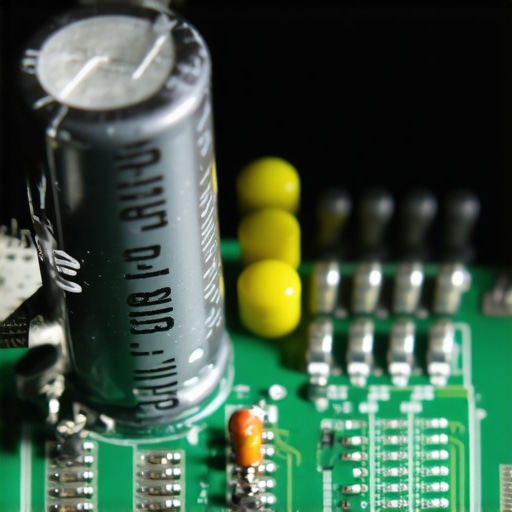
Avoid the Amateur Installation Traps
I see it all the time: a homeowner buys a brand-new machine, installs it themselves, and then wonders why there’s a puddle in the kitchen three months later. One of the biggest oops factors is the use of thread tape. You might think you’re being thorough, but why you should never use plumbing tape on a water inlet valve is a lesson usually learned the hard way. It interferes with the compression seal and leads to the common plumbing errors that cause dishwasher floods. If you do find yourself in a bind, don’t just rely on your original paperwork. Knowing how appliance diagnostics can save your warranty benefits can save you thousands. Most people don’t realize the truth about third party warranties and hidden deductible costs until they are already on the hook for a service call. Have you ever fallen into this trap? Let me know in the comments. Whether you are dealing with why your dishwasher wont start even though theres power or trying to decode top signs your dishwasher needs professional diagnostics, remember that the software is only half the battle. Your physical maintenance habits—like the debris trap most owners miss during monthly cleaning—are what actually protect that expensive circuit board.
Put Down the Wrench and Grab a Multimeter
If you want to move from a frustrated owner to a kitchen master, you have to stop guessing. My diagnostic kit doesn’t live in the garage; it lives in a drawer next to the silverware. My most used tool isn’t a pipe wrench—it’s a digital multimeter. I’ve learned the hard way that knowing the exact multimeter reading for a healthy thermal fuse can save you a $300 service call. You are looking for a reading of nearly zero ohms; anything else means the circuit is blown. I’ve seen so many people replace entire control boards when they actually just needed to learn the specific way to test a thermal fuse for continuity.
How do I keep my dishwasher’s digital brain healthy over time?
It comes down to consistency and the right documentation. Every machine has a secret: the Tech Sheet. I never start troubleshooting dishwasher problems without it. You can usually find it by learning how to find a service manual hidden inside the unit—it’s often tucked into a plastic sleeve behind the bottom kickplate or inside the door panel. This sheet tells you the specific button combinations to enter ‘Service Mode,’ which provides a digital readout of every error code the machine has logged. 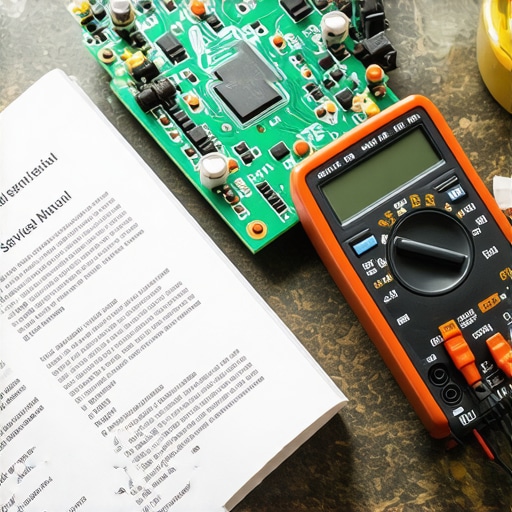
The Secret Map Hidden Behind Your Kickplate
I’ve also found that a simple magnet is an underrated diagnostic tool for modern appliances. Knowing how to test your float switch with a simple magnet lets you bypass the door sensor or test the reed switches without tearing the assembly apart. As the Digital Right to Repair movement highlights in their technical documentation, the shift toward integrated sensors means we must rely more on these electronic bypass tests than on visual inspections. Looking forward, I predict we will see appliances with integrated AI that predicts part failure based on vibration patterns, but for now, your best bet is knowing when to trust a warranty for dishwasher repairs versus when to pick up the meter yourself. My challenge to you is simple: Go find your machine’s tech sheet tonight. Don’t wait until the screen is blank and your kitchen is flooded to figure out where that secret manual is hiding.
Three Hard Truths the Salesman Never Mentioned
After years of troubleshooting my own machines, I’ve realized that a smart appliance is only as good as its last data sync. First, software is a wear-and-tear item just like a rubber seal; if you don’t manage the digital cache, the physical hardware eventually suffers. Second, the ‘cloud’ is often the weakest link in your kitchen. I’ve seen top signs your dishwasher needs professional diagnostics that actually started as simple server-side timeout errors that the machine interpreted as hardware failures. Finally, your warranty is a legal contract, not a safety net. I’ve learned that the photo evidence you need for every warranty claim is your only real shield when a manufacturer tries to blame ‘network instability’ for a fried motherboard.
The Essential Kit for Appliance Survival
If you want to stop feeling helpless when the ‘Check Water’ light blinks, you need a specific diagnostic toolkit. First, a digital multimeter is non-negotiable. Knowing the exact multimeter reading for a healthy thermal fuse will save you more money over five years than any extended service plan. Second, keep a simple magnet and a business card in your kitchen drawer; they are the easiest ways to test door latches and float switches. Lastly, I always recommend keeping a digital folder of troubleshooting dishwasher problems expert diagnostics repair tips. I trust these methods because they focus on the ‘why’ behind the failure, helping you decide when to trust a warranty for dishwasher repairs versus when the fix is a simple five-minute DIY task. #IMAGE_PLACEHOLDER_E#
Don’t Let the Software Intimidate You
The transition from a mechanical home to a digital one is undeniably bumpy, but you have more control than you think. By mastering the ‘digital handshake’ and treating your kitchen maintenance like a system pre-flight check rather than a chore, you can actually lower your appliance operating costs by 15 percent while significantly extending the life of your control boards. You don’t need to be an engineer to keep your dishes clean; you just need to be more observant than the machine’s own sensors. Have you ever had a firmware update go sideways or brick a device in your home? Let me know how you fixed it in the comments below!