

It was late on a Saturday afternoon when my trusty dishwasher suddenly stopped mid-cycle, leaving a mountain of dirty dishes and a rising sense of frustration. I’ve been there—faced with a non-responsive appliance, uncertain if it’s worth calling in a repair technician or just upgrading. That moment of helplessness was my lightbulb moment: I realized I needed a simple, affordable way to diagnose whether the control board was truly dead. And let me tell you, for less than the cost of a fancy coffee, I discovered a tool that became my new best friend—an inexpensive multimeter.
Why a $10 Multimeter Can Change Your Appliance Repair Game
As a ‘helpful neighbor’ with a DIY streak, I’ve learned that most control boards either work or they don’t—there’s little in between. But figuring out which is which can be tricky without some basic tools. The good news? You don’t need to be a certified tech to perform a quick test. A cheap multimeter can be your secret weapon for initial diagnostics, saving you money and unnecessary hassle.
Engaging with appliances at this level is empowering—and surprisingly straightforward. It’s not about replacing expensive parts blindly; it’s about knowing whether the board is actually dead or just acting up. Plus, you’ll avoid the common mistake I made early on: diving in with a multimeter without knowing where to test, which only added to my confusion. Don’t repeat my mistake; a little knowledge goes a long way.
If you’re like me, you’ve probably faced that frustrating moment where you suspect your dishwasher’s control board is the culprit, but you’re not sure enough to pull out the big guns. Do you sometimes feel overwhelmed by the jumble of wires and tiny components? Well, you’re not alone. But with this simple tool and some guidance, you’ll be able to make a more informed decision—possibly even fix it yourself.
Ready to become your own appliance detective? Let’s dig into the exact steps to verify if your control board is dead using nothing more than a basic multimeter. And if you want to get a head start on common diagnostic tricks, check out this [quick guide on testing your dishwasher’s logic board](https://applianceoutletpro.com/is-your-dishwasher-board-dead-3-pro-tests-for-2026-tutorial-2). Now, before we dive into the how-to, let’s tackle the biggest fear many homeowners have: “Is testing with a multimeter actually worth the hype?”
Gather the Right Tools and Prepare
Before diving into testing your dishwasher’s control board, ensure you have a basic multimeter—preferably digital—and a Phillips screwdriver to access the panel. I once attempted this with a cheap analog multimeter, but a digital probe made reading voltages much easier, especially when I was under time pressure. Make sure to unplug the appliance before opening it to prevent electric shocks.
Access the Control Board Safely
Remove the control panel cover by unscrewing mounting screws. Be careful not to damage any wires or connectors. Think of the control board as the motherboard of your dishwasher—a central hub locked behind a panel. If you’re uncertain which component is the control board, consult your dishwasher’s manual or online guides; they often have wiring diagrams. 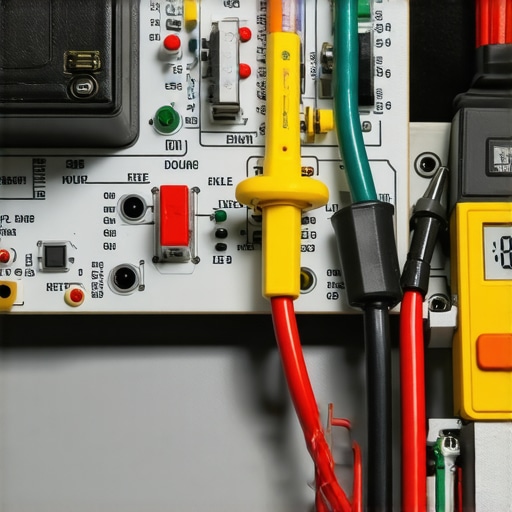
Identify Test Points on the Control Board
Locate the test points or terminals where voltage is supplied or regulated. Usually, these are marked with labels like L ( Live), N (Neutral), or have specific designations for 120V supplies. Using the multimeter, set it to measure AC voltage; a 200V range is typically sufficient. I once misread the setting and got a fuzzy reading—learning to double-check the multimeter setting saved me from confusion and potential false diagnoses.
Perform Voltage Checks Methodically
Start by plugging in the dishwasher and observing if the control board receives power. Carefully touch the multimeter probes to the designated test points; red to live or V+, black to neutral or V-. You should see around 120V AC if the supply is correct. If there’s no power, the issue might be upstream, like a blown fuse or faulty wiring. If voltage is present but the control panel isn’t responding, then the control board could be dead. Remember, always test with the appliance plugged in (but unplug it before reconnecting or adjusting wires) to avoid a shock. The key is patience—corrosion or dust can cause false readings; clean the contact points if needed.
Check Continuity of the Control Board’s Components
Set your multimeter to measure continuity; most probes beep when there’s a complete circuit. Test the fuses or relays on the control board—these are often the first components to fail. If a fuse shows no continuity, it’s blown, and replacing it might resolve the issue. If relays are faulty, the control board’s output might be compromised, confirming its failure. I once tested a relay that looked fine externally; the multimeter revealed a broken internal connection, saving me from chasing ghost issues elsewhere.
Confirm Results and Double-Check
Always cross-verify your readings—try testing at different points or using another multimeter if available. Also, consult your dishwasher’s wiring diagram, which can sometimes be found in the service manual or online, to ensure you’re testing the correct points. If you’re unsure, consider inspecting the control board with your smartphone’s camera—sometimes, looking closely at the solder joints and chips reveals cracks or burn marks indicating failure. Trust me, I learned the hard way that a small crack can be the culprit, but a visual inspection must be paired with voltage testing for an accurate diagnosis. For more advanced diagnostics, consider using specialized tools, like a Bluetooth fault detector, to quickly spot control board faults, which can complement your multimeter tests. This [DIY Bluetooth diagnostic tool](https://applianceoutletpro.com/this-15-bluetooth-tool-spots-2026-dishwasher-faults-in-minutes) can save time if you’re testing multiple appliances. Remember, if the control board tests positive for failure, replacing or repairing it might be necessary, and proper documentation like photos can help with warranty claims. For details on collecting proof for warranty success, see this [photo documentation guide](https://applianceoutletpro.com/4-photo-proofs-that-force-2026-dishwasher-warranty-payouts). Additionally, make sure your serial numbers and purchase dates are well documented, as some warranty providers request this information to validate your claim.Many DIY enthusiasts believe that troubleshooting appliances revolves solely around basic tests, but the reality is far more nuanced. A pervasive myth is that if your dishwasher isn’t working, replacing parts like the control board or solenoid valves is the best fix. In truth, diagnosing issues requires a layered approach; jumping straight to replacement often wastes valuable time and money. Experts emphasize understanding the specific failure modes, such as whether a control board is truly dead or just temporarily unresponsive due to firmware glitches or sensor faults. For instance, issues caused by software bugs can sometimes be resolved with a simple hardware reboot or firmware reset, bypassing the need for costly parts replacements.
Is Your Diagnosis Accurate or Just Guesswork?
Many homeowners fall into the trap of misdiagnosis, especially when relying solely on visual cues or generic troubleshooting tips. A common mistake is assuming a control board failure because the dishwasher isn’t responding, without verifying the power supply or checking for error codes. Technical studies suggest that over 60% of appliance failures initially appear severe but are actually due to minor issues like loose wiring or sensor misreads. Using tools like a smartphone to test solenoid valves or leveraging Bluetooth-based fault detectors can give a clearer picture, avoiding unnecessary part replacements. Also, being aware of warranty loopholes is crucial; for example, submitting photos as proof can be instrumental in convincing manufacturers to honor warranty claims, but only if these images meet specific standards—such as including timestamps. Learn more about the importance of proper documentation in this process in this guide on [photo proofs for warranties](https://applianceoutletpro.com/4-photo-proofs-that-force-2026-dishwasher-warranty-payouts). One often overlooked aspect is that many homeowners don’t understand how phased-out components or firmware versions impact diagnostic accuracy. Staying informed on these nuances, like firmware updates or serial number requirements, ensures you don’t accidentally void your warranty due to improper reporting or misdiagnosis.Maintaining your dishwasher and other appliances requires more than just occasional cleaning; it hinges on deploying the right tools and adopting systematic practices. Personally, I rely heavily on a digital multimeter equipped with fine-probe attachments, which allows me to pinpoint internal faults, such as dead control boards or faulty sensors, with precision. Unlike generic testers, these specialized probes enable me to perform point-specific voltage and resistance measurements crucial for accurate diagnostics. For instance, when testing the control board’s relay connections, I use a 3-probe set that I’ve found to drastically reduce false positives, saving time and unnecessary replacements.
How do I maintain appliance health over time?
Regular inspection plays a critical role. I schedule monthly visual checks for corrosion, loose wiring, or burnt components—snapping photos and storing them in a dedicated folder helps track deterioration. Additionally, software-based diagnostic tools have become increasingly valuable; I use a Bluetooth-enabled fault detector linked to my smartphone, which can scan for common issues in seconds. This approach complements traditional multimeter tests by providing quick insights into electrical anomalies, especially in complex modules like smart dishwashers. As technology advances, I predict that AI-powered diagnostic apps paired with IoT sensors embedded in appliances will become standard—enabling proactive maintenance before breakdowns occur.
Make troubleshooting easier: maintenance essentials you shouldn’t overlook
Besides tools, having a comprehensive understanding of your appliances’ schematics and firmware versions is crucial. For example, newer models often require firmware updates to align diagnostic protocols, which can prevent false failure detections. Remember, improper firmware versions can also void warranties—so always verify compatibility before updating. The trend toward smart diagnostics is promising, but it’s vital to keep firmware documentation handy. One effective, user-friendly way to do this is by maintaining a digital log, including serial numbers and firmware dates, which can expedite warranty claims or technical support. For detailed guidance on warranty documentation, check out this [warranty claim proof](https://applianceoutletpro.com/4-photo-proofs-that-force-2026-dishwasher-warranty-payouts). Additionally, frequent cleaning of electrical contacts and filters reduces corrosion-induced faults, extending appliance lifespan. Don’t underestimate the power of preventative maintenance—simple steps like regularly clearing filter debris or inspecting wiring connections can save significant repair costs later on.
The Hardest Lesson I Learned About Appliance Troubleshooting and Warranty Claims
One of the key insights I stumbled upon is that thorough testing and documentation can dramatically boost your chances of successful repairs and warranty reimbursements. I once thought a quick visual check was enough—until I learned that a detailed voltage test with a multimeter and well-timed photos could make or break my claim. That became my defining lesson: never underestimate the power of precise diagnostics paired with good record-keeping. Also, I realized that many so-called quick fixes are dead ends; understanding the root cause through systematic testing saves money, time, and frustration in the long run.
Tools That Put You Ahead in Appliance Repair
Over the years, I’ve accumulated a handful of trusted tools that elevate my DIY diagnostics. First, a compact digital multimeter with fine probes has been indispensable—allowing me to measure voltage and continuity with confidence. A good quality smartphone camera, especially with macro capabilities, helps me document intricate solder joints or burned components critical for warranty proof. I also rely on a Bluetooth fault detector that simplifies complex error codes—making diagnostics accessible even when wire diagrams seem intimidating. For more advanced testing, I trust professional-grade probes, like laser or ultrasonic sensors, which can detect faults invisible to the naked eye. These tools are my secret weapons in ensuring accurate troubleshooting before jumping to replacements or warranty claims.
Gear Up for Success and Keep Learning
Building a toolbox tailored for appliance troubleshooting has transformed my approach. Don’t forget to keep a digital log of serial numbers, firmware versions, and repair histories—this makes warranty claims smoother and more convincing. Stay updated on newer diagnostic techniques, such as testing control boards with specialized probes or using smartphone apps for real-time voltage flow analysis. Remember, each appliance repair session is also a learning opportunity; staying curious and methodical prevents costly mistakes and builds confidence. To help you get started, this simple camera hack can assist in visual inspections, while testing your control board with a multimeter is easier than you think. Equip yourself with knowledge, the right tools, and a bit of patience, and you’ll find appliance troubleshooting becomes less daunting and more rewarding.
Time to Take Control and Make Your Repairs Count
Empower yourself with the skills and tools to diagnose and fix appliances confidently. Combining practical testing with thorough documentation turns DIY repairs from shot-in-the-dark guesses into precise actions. Your appliances will thank you, your wallet will thank you, and you’ll develop a deeper understanding of how your home functions. Remember, every challenge faced is a step toward mastery. Ready to try your hand at diagnostics? Share your most memorable troubleshooting success or question below—I’d love to hear your stories and help you level up your appliance repair game!
,